Personal project, live web app, built by directing AI agents
Sightline: analysing a Counter‑Strike 2 match like a professional staff
In Counter-Strike 2, every match can be recorded in a demo file that holds everything: positions, shots, grenades, money. Sightline turns these files into a 2D replay, statistics and preparation tools for a team. I built the first version in three days by directing AI agents, then grew it until it covers most of a professional tool: I decide what to build and how to check it, the agents write the code. I then linked it to n8n and Discord: team calendar, pre-match prep, demos imported on their own and AI-written debriefs.
The need
To improve at Counter-Strike you have to review your matches: where the players were, why a round was lost, what the opponent usually does. The tools teams use for this are online services, most of them paid. I wanted my own tool, hosted on my server, covering the whole need: import a demo, replay it, analyse it and prepare the next match.
Vibe coding, with a method
Vibe coding means describing what you want in plain language and letting an AI write the code. It is fast, but the risk is well known: you end up with an app nobody understands, full of invisible mistakes. My job was to manage these agents the way you would manage a team of developers.
- Specify before coding. Each major part (import and replay, statistics, grenades, heatmaps, annotations, team space, scouting) first gets a design document that sets the expected result. With the audits, that makes 22 documents.
- Split and assign. Twenty-two implementation plans break the work into small tasks, handed one at a time to agents, with a review between tasks.
- Verify. 96 automated test files, tests on real match demos, full user journeys played in a browser and scripted “beta tester” journeys.
- Compare and fix. I had the 57 features of a professional product on the market, Skybox EDGE, inventoried, then the gap split into thirteen sub-projects. Result: 42 features covered, 11 partial, 2 missing, 2 out of reach (they need game servers). Ergonomics and speed audits follow every major step.
- Operate. The app runs in a Docker container on my server, over HTTPS, with mandatory sign-in and a nightly database backup kept for 14 days.
What the app does
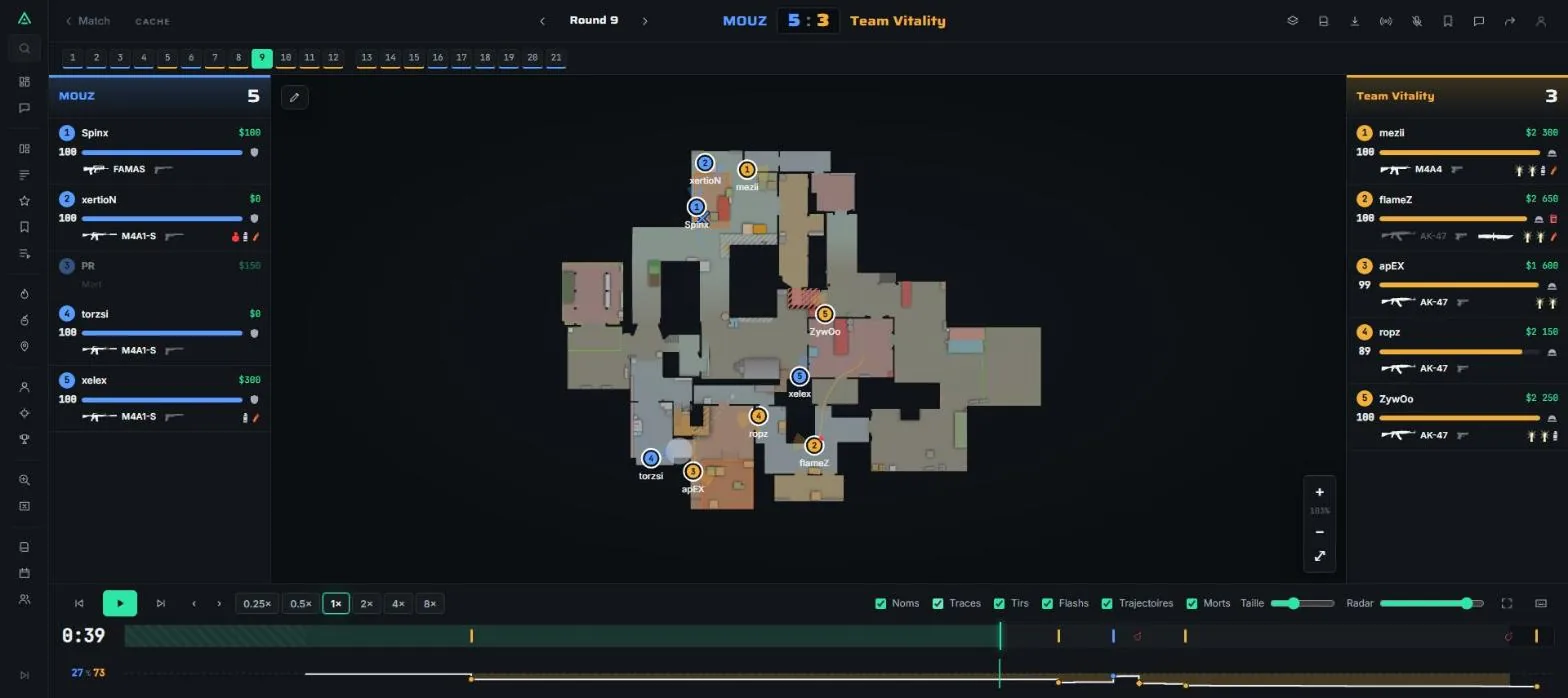
- Import a folder of demos, a file dropped into the window or a FACEIT link; n8n fetches practice-match demos and those of upcoming opponents on its own, and a Discord bot lets the team request more on the fly.
- Replay every round in 2D, with smokes pierced by grenades and bullets, voice comms aligned with the replay (by hand for now, automatic alignment in progress) and a group review where a leader drives the replay for everyone.
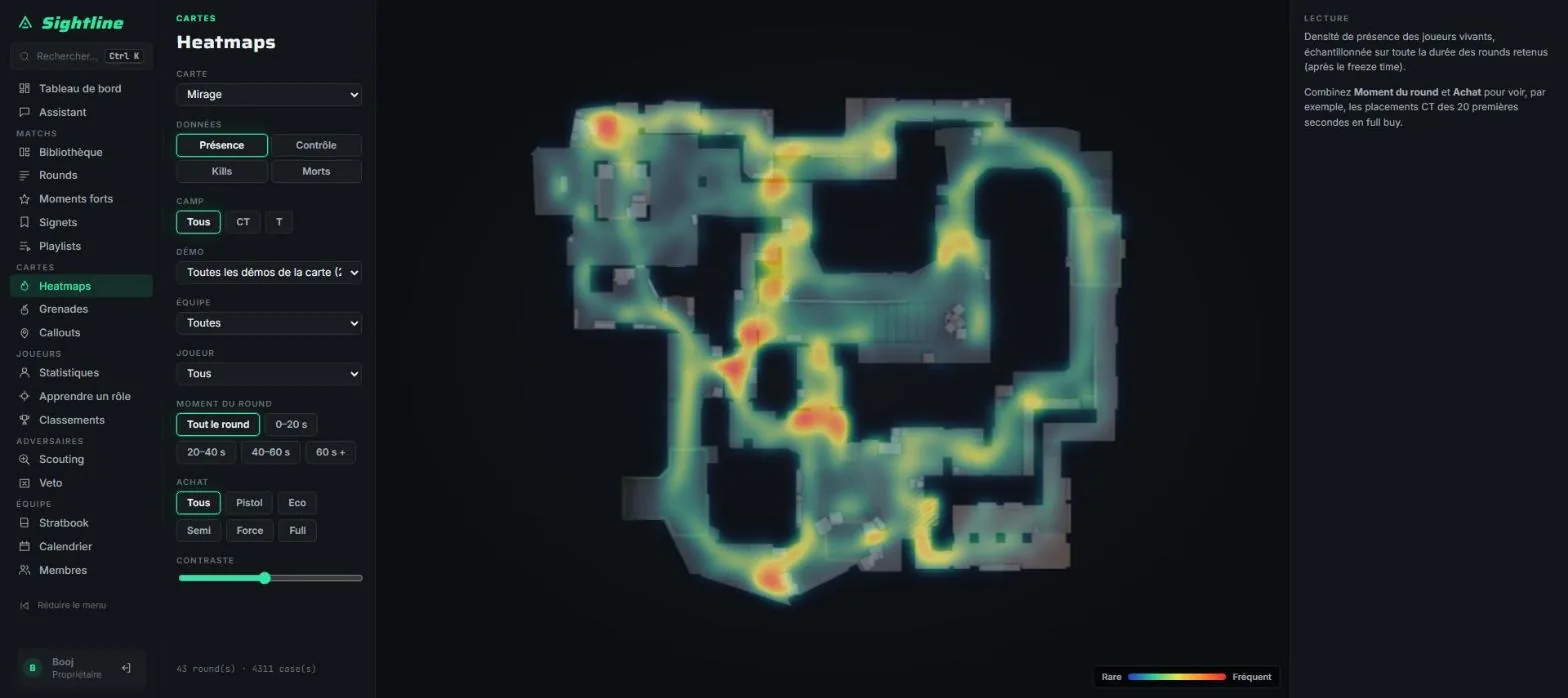
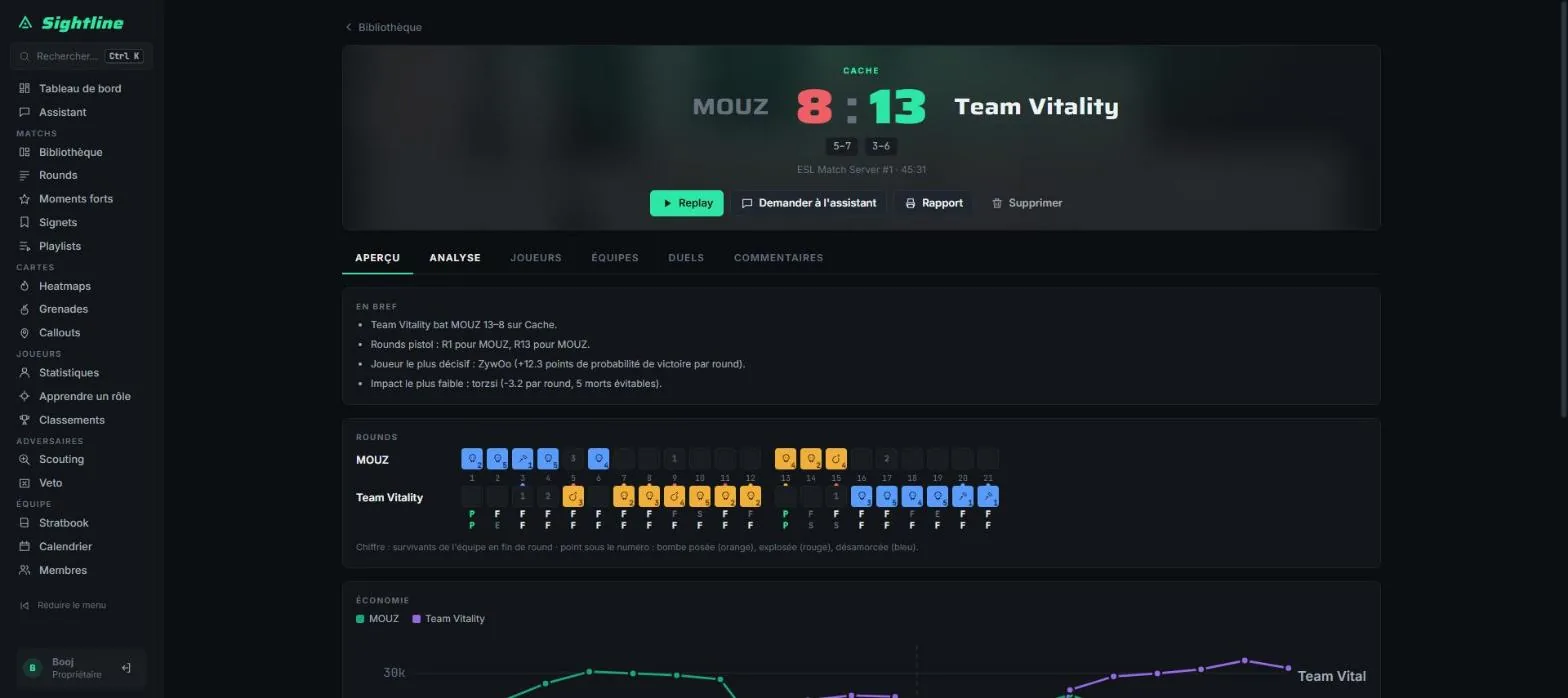
- Analyse the round-by-round win probability, the economy, heatmaps, highlights (clutches, multi-kills) and player leaderboards.
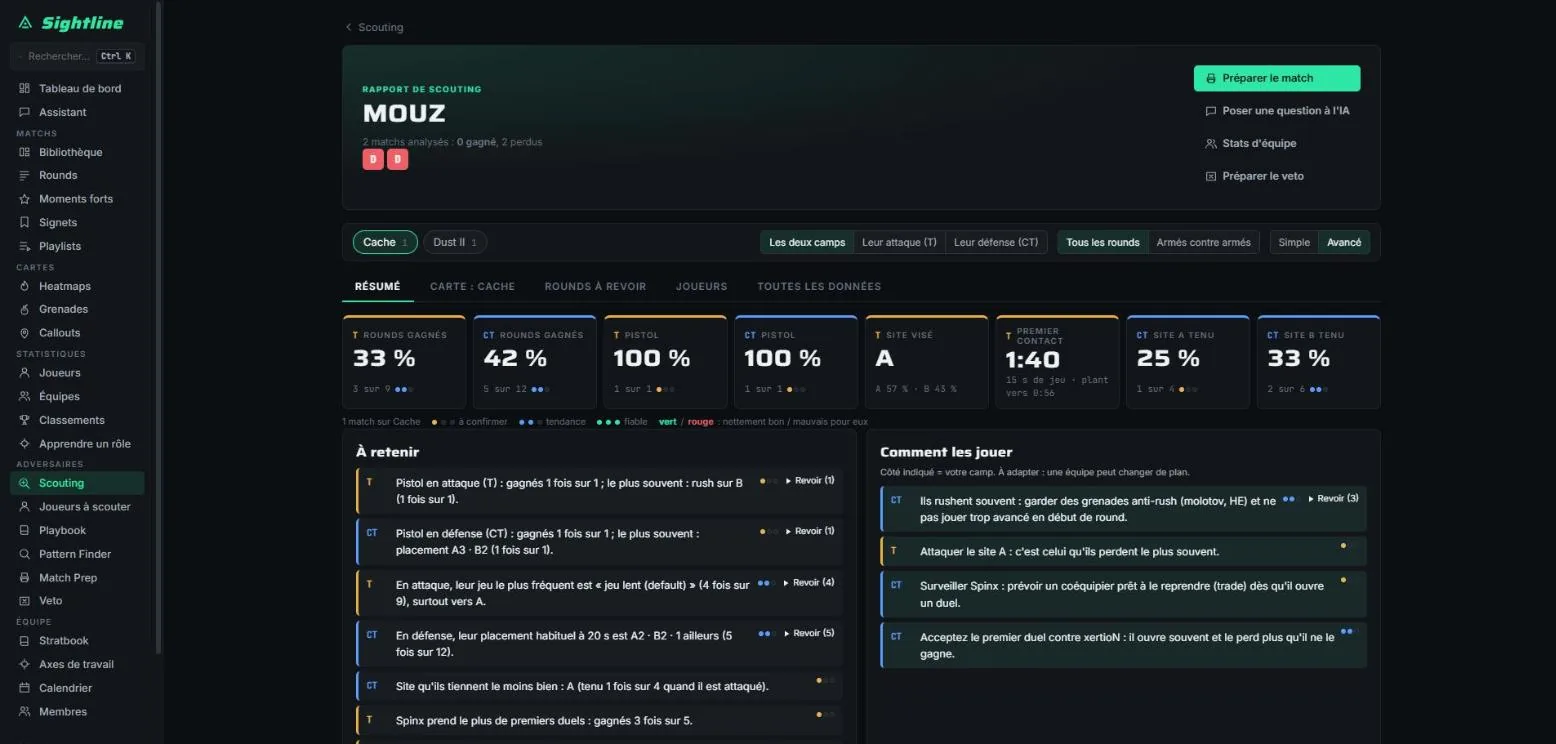
- Prepare for an opponent: a scouting sheet across several demos, rounds to review, a veto simulator with predictions, a match prep file, a team playbook, and a calendar synced with PRACC and FACEIT, with the likely maps of league opponents.
- Organise strategies in a one-page Stratbook (list, map, Plan · Players · Grenades · Notes panel), with layers and a focus on one player, and callout zones the team can redraw itself: their names then apply to every analysis.
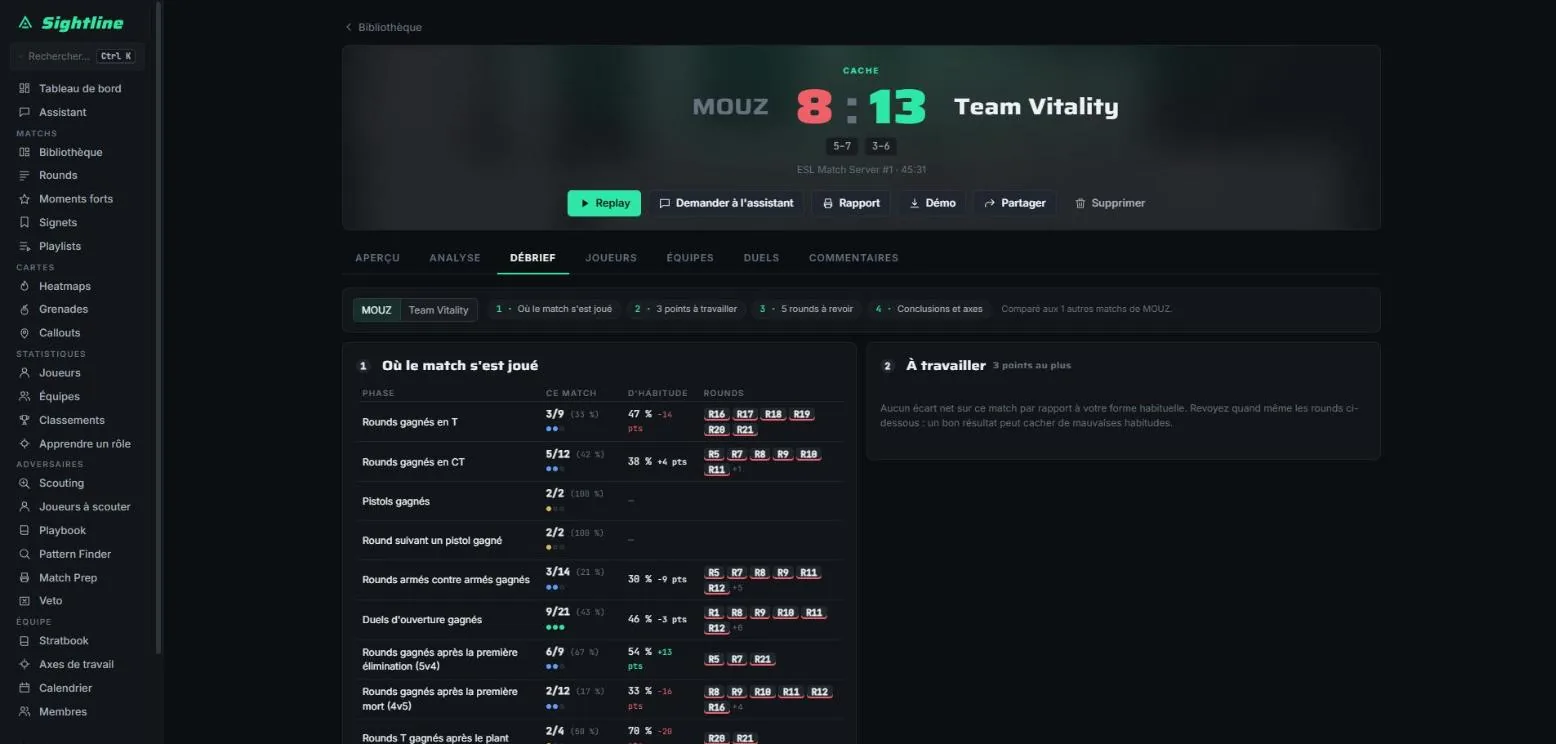
- Debrief like a staff: where the match was decided compared with usual form, three points to work on, five rounds to review and goals tracked from one match to the next.
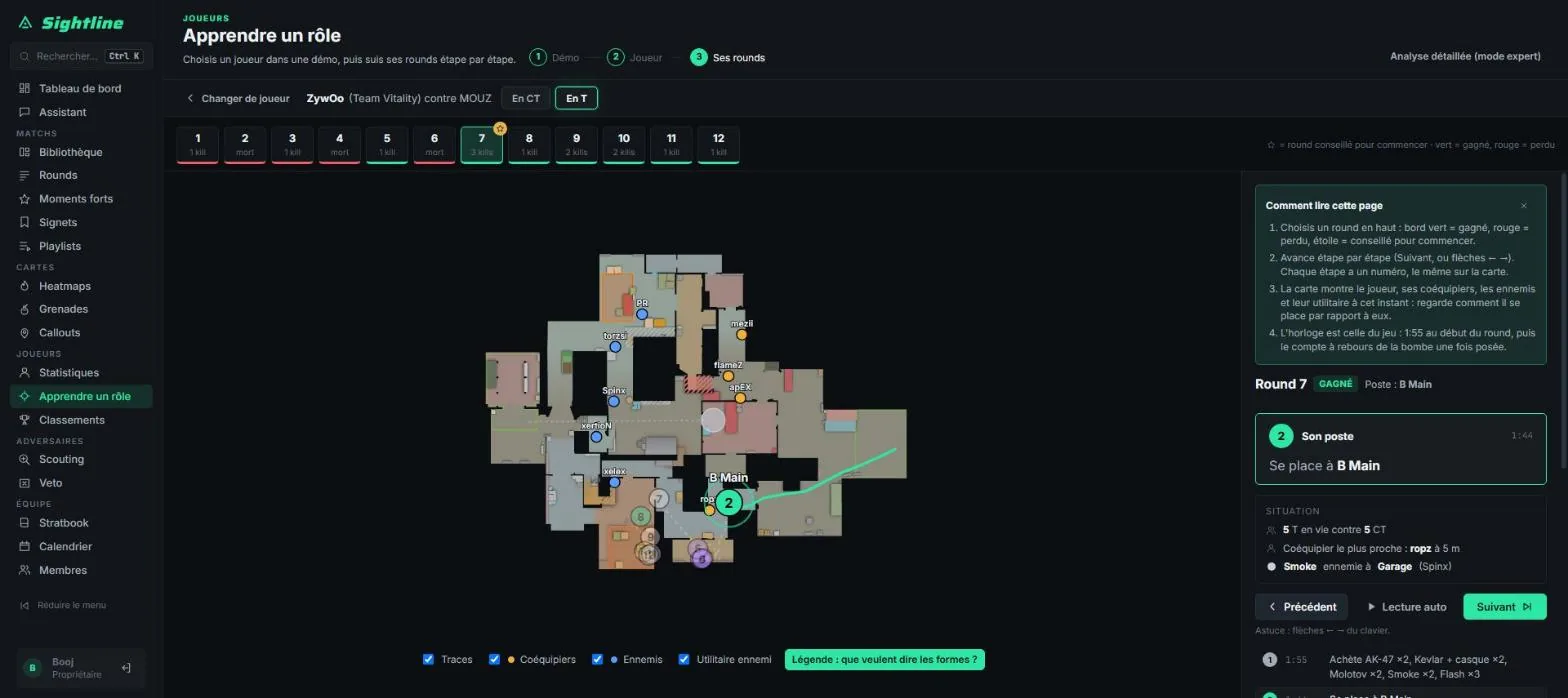
- Learn a role by following a professional player step by step, with an AI coach that explains a round, and ask questions to an assistant that reads the match data without being able to change it.
- Understand mistakes: for each death, where the player was looking when the duel started and whether they had help; grenades bought but never thrown; the opponent's slow rounds broken into phases. In the replay, the list of a round's grenades, with what is needed to replay them in game.
- Take notes on a map, a match, an opponent or a strategy, for yourself or for the team, on the site as well as in the mobile app.
- Get notified: live team notifications, also on Discord, when a match is ready or commented on; for one of the team's matches, a three-line debrief written by the AI.
- Keep Sightline in the pocket: a mobile app for the player, with the same accounts and data.
Making AI reliable: a checked scouting report
Sightline can write a scouting report on an opponent, as an analyst would. The risk of AI-written text is well known: it can invent a figure or swap two bomb sites with great confidence. So I had the report built so that the software computes the facts, the AI only writes, and everything is checked before display.
To know whether this check holds, I had it measured on a test bench: known errors are injected into real reports (shifted figure, wrong percentage, non-existent fact, swapped sites), and we count what gets caught.
- CountedNumber errors caught by the automatic check: from 81% to 89-92% after tightening the rules, with no false alarm on an intact report.
- CountedMeaning errors (swapped sites or players): the number check sees none, the judge catches 10 out of 12, with 2 alerts on the intact report.
| Model | Cost per report | Duration | Unjustified figures | Judge remarks |
|---|---|---|---|---|
| Claude Haiku 5.5 | $0.014 to $0.024 | 35 to 68 s | 0 | 15 |
| Claude Sonnet 5.5 | $0.15 to $0.36 | 19 to 46 s | 0 | 15 |
| Claude Opus 5.5 | $0.63 to $0.89 | 63 to 80 s | 0 | 4 |
Decision drawn from the measurement: the user picks the model when writing. Haiku for a routine report, Opus before an important match, as it makes the fewest meaning errors. The judge rereads every report for about one cent. The full evaluation cost about $3.20.
Automating around the app with n8n
The team plays its practice matches on PRACC and its official matches on FACEIT. I wanted demos to reach Sightline on their own, the team calendar to stay up to date without typing, and the team to get a Discord prep before every match and a debrief after, without opening the site.
I put n8n at the centre. Sightline does not know about n8n: it only exposes protected entry points, and all the integration logic lives in workflows that read as diagrams, with the run history. Adding a destination, such as another messaging app or a spreadsheet, does not require touching the app's code. The core (API keys, webhooks, workflows W0 to W2) followed the same method as the rest, on 22 October 2026: specification, a nine-task plan, a review after each task, then a review of the whole before going to production. The extension, the form and the debrief fixes were added on the 23rd, tested, but without that final review. The calendar, the pre-match prep, the FACEIT matches and a Discord bot followed on 23 and 24 October. The core has been in service since 23 October and the rest since the 24th: six workflows run on my server, and the extension runs a round every 30 minutes.
Six workflows and a bot
- W1, from PRACC and FACEIT to Sightline. Every 30 minutes, a Chrome extension reads the team's demos and calendar on PRACC, with the session open in the browser, and sends them to n8n. n8n keeps only new, available demos, asks Sightline which ones it already has, then has at most three imported per round, filed with their date and opponent, never during the server's nightly backup. Every 5 minutes, the extension also fetches the requested FACEIT demos, from the match page, in the signed-in browser: the server cannot download them itself.
- W2, from Sightline to Discord. Sightline sends a signed event when a demo arrives, when a match is analysed for the first time or when an import fails, and n8n posts the message to the team's channel. For one of our team's matches, n8n reads the debrief and statistics in Sightline, then Claude Haiku turns them into three lines from our point of view: the key fact, what worked, what cost us rounds, instructed to use only figures present in the data.
- W6, the FACEIT calendar. Every 15 minutes, the server reads our league matches from the FACEIT API, without depending on a PC, and finds our team through the linked Steam accounts. A new match enters the calendar, shown in each person's local time, and a rescheduled match is updated and announced on Discord. For each opponent, Sightline works out its likely maps and queues two demos of its matches, on those maps first.
- Likely maps. For each map, its frequency for the opponent is multiplied by its frequency for us, over ESEA matches, with smoothing. It is a trend, not a prediction: FACEIT does not give the ban order, and a warning shows when the opponent has fewer than five ESEA matches. They appear on Discord, on the site and in the mobile app.
- W5, the pre-match prep. 24 hours before every match, practice or tournament, n8n posts on Discord the match time, our record against the opponent with a link to the last three matches, the maps we have seen them play and, for an official match, their likely maps.
- The /demos Discord bot. A member of the team's Discord server types /demos to request an opponent's demos, two by default and five at most. Sightline imports and analyses them, then they are announced on the channel. One requested demo means one map, the most likely ones first.
- W4, an import form. An n8n page protected by a team login, where a teammate without an account drops a demo, up to 1 GB. It follows the same path, without duplicates, and n8n keeps neither the file nor the run.
- W0, monitoring. If any workflow crashes, n8n posts the workflow name, the step and the error message on Discord.
What Sightline exposes, and how it is protected
- API keys with limited rights: import demos, or read matches, players and teams, never settings or accounts. Each key is stored as a hash, shown only once and revocable; an action outside its rights is refused.
- Signed events: each delivery carries a JWT signed with the webhook's secret and valid for 5 minutes, which n8n checks itself. Three attempts, a delivery log, and the destination address checked again before each delivery, to refuse internal addresses.
- A verified bot: Discord signs every request with Ed25519; Sightline checks the signature with the application's public key and refuses any request older than 5 minutes. The bot token stays on the server, and its replies cannot mention anyone.
- A guarded demo queue: no imports below 3 GB of free space, three attempts per request, and incoming links checked (internal addresses refused, a demo file expected, five at most, only for a pending request).
- Imports without duplicates: a demo is imported only once per identifier, a file already present is attached to its demo, and a broken demo is dropped at the third failure instead of coming back every 30 minutes.
- An isolated n8n: in its own container, reachable over HTTPS only, without system commands, with encrypted credentials. The exported workflows contain no secret: I paste every key into n8n myself.
What going live taught me
- PRACC ties the session to the IP address. Copied to the server, it was refused, and PRACC signed me out. Hence the extension: reading happens in my browser, the session never leaves Chrome, and n8n keeps every decision.
- The first debrief on a real match revealed three defects, fixed the same day. n8n 2's AI agent no longer ran the HTTP tools I had given it: it is replaced by a single call to Claude, one call instead of three or four. The model used up its answer thinking and returned an empty summary. And the summary read the debrief of the match's first team, here the opponent, instead of ours.
- The first automatic import, on the night of 23 to 24 October, needed two fixes on the spot. A hidden FACEIT page gave no link: the extension now opens the page in a small visible window, then clicks a second time if needed. The four demos of two opponents were ready 35 minutes after being queued, analysed and announced on Discord.
- Real use surfaced three more defects, fixed the same day. A requested BO3 brought back all its maps: one request now means one map. Each analysed demo posted two messages on Discord: Sightline's old message gives way to n8n's. And Chrome pre-filled the bot token field with the site password, which would have been sent to Discord: token and AI key fields are no longer pre-filled.
Syncing TeamSpeak comms with the replay (in progress)
Reviewing a round with the team's comms helps understand what was said at the key moment. Sightline could already play one audio track per player in the replay, but it had to be aligned by hand. On 24 and 25 October, I led the design and the agent-driven build of a chain meant to record the comms and align them on its own, on any game server.
- A home-made TeamSpeak 3 plugin, in C++17, 32 and 64 bits. It writes one Ogg Opus track per voice, before mixing, all starting at the same instant, and also reads CS2's Game State Integration to start and stop with the map and note the start of each round. Only one teammate will need to install it, and a message in the TeamSpeak channel announces the recording.
- Uploads designed to lose nothing: at the end of the map, the session is sent to Sightline; after a failure, it waits in an on-disk queue and is retried when TeamSpeak starts, then every 10 minutes. The key is encrypted for the Windows account (DPAPI), and the site address is strictly validated.
- On the Sightline side, live since 25 October: a dedicated key that opens only the comms upload route, validated and capped sessions (200 MB, 12 tracks), and automatic linking to the right match from the map, the score, the recording player and the demo's import date. The offset is the median of the gaps measured round by round, and outlier rounds are discarded. Each voice is filed under its player thanks to the TeamSpeak nickname each member sets in Sightline, on the site or in the app.
- Checked by tests: 5 plugin suites passing in 32 and 64 bits, a full upload run without TeamSpeak, with two synthetic voices received by a local Sightline, and 15 server tests. The plugin was built by agents task by task (ten of the plan's twelve tasks delivered), each one reviewed: the reviews found at least twelve important defects, including a size overflow in 32 bits and a recording that never ended when CS2 closed.
Not in service yet. The installer package is not finished, and no real session has been recorded. The real test, a map played with the team, must check alignment within half a second. No real recording exists yet; once there are some, they will not be published here, as they are my teammates' voices.
Verifiable results
- Counted287 commits from 10 to 25 October 2026, in the project's Git history, including 93 for the first version in three days, 40 for the n8n and Discord automations and 15 for the TeamSpeak plugin.
- Counted22 design and audit documents, and 22 implementation plans.
- Counted96 automated test files: 59 for the server, 17 for the interface, 18 for the mobile app, 2 for the n8n workflows and the Chrome extension, plus 10 C++ files for the TeamSpeak plugin. Latest runs, all passing: 279 server tests, 68 interface tests and 71 full browser journeys on 25 October; 84 mobile app tests on the 24th; 26 workflow tests and 12 extension tests, rerun on the 26th; the plugin's 5 suites, in 32 and 64 bits, on the 25th.
- CountedMeasured during design on the demo library (1,840 duels): a player helped by a flash or molotov wins 63% of duels, against 47% for a “dry” duel. This is the finding the duel analysis puts in front of the player.
- RecordedDesign pass across the whole site: secondary text contrast raised to at least 5:1 on all four backgrounds, and an 11 px minimum for interface text.
- RecordedApp live on my server over HTTPS; without an open session, the API refuses every request, except sign-in and public share links.
- RecordedIn production on 23 October: a round from the Chrome extension to Sightline through n8n, with no new demo to import, and the AI debrief of a real team match posted on Discord, by replaying an already analysed match.
- RecordedIn production on 23 and 24 October: the team's FACEIT matches added to the calendar on their own, their likely maps computed from real history, and 10 opponent demos fetched by the extension, analysed and announced on Discord with no manual import, for 7 requests (6 queued automatically, 1 via /demos); 3 of them were unwanted extra BO3 maps, hence the “one request, one map” fix.
- RecordedReview of the whole n8n core before its first production deployment: 4 important defects found and fixed, including a redirect that could have sent the PRACC cookie to another site.
- RecordedFrom the history: demo import made 2.5 times faster, then a further 25% faster with identical data; code loaded at start-up cut from 105 to 85 KB.
- RecordedMeasured live after a speed audit: scouting sheet from 950 to 250 ms, player page from 1,900 to 250 ms; 250 ms is the network round trip itself.
What I take from it, and the limits
- My contribution is not typing the code. It lies in the specification, the splitting, the verification and the operations. I can explain the architecture and every choice, not recite every line.
- A dependency to watch. Reading demos relies on the demoparser2 library, which has to follow every game update. The code is organised so that a single file depends on it.
- AI keeps its limits. The check cannot see an invented number that happens to match a real value, and the judge is sometimes wrong. That is why the text stays tied to its facts and the remarks stay visible.
- Automation that depends on an open browser. PRACC only accepts the session from the address where it was opened, and FACEIT does not let the server download its demos: the extension runs only while Chrome is open on my PC. Nothing is lost: it catches up on missed demos at start-up, and a teammate can install the same extension to take over.
- Voices to protect. The TeamSpeak plugin records teammates: it announces the recording in the TeamSpeak channel, but each person's consent and how long tracks are kept remain to be defined before real use.
- No usage figures published here. The screenshots on this page show public professional matches, not a team's data.
Next step: a 3D replay in the browser, with heights, the player's view and grenades in 3D. It was designed on 25 October and planned on the 26th; development started the same day on a separate branch, and nothing is live yet.